
How to Deploy FastAPI in Production (Step-by-Step)
Published on March 2, 2026
By ToolsGuruHub
Your FastAPI app works perfectly on localhost. You've tested every endpoint, the Swagger docs look great, and you're ready to ship. Then you Google "deploy FastAPI production" and get hit with a wall of options - Uvicorn, Gunicorn, Docker, Nginx, systemd, Kubernetes - and suddenly you're not sure where to start.
This guide cuts through the noise. It's a step-by-step walkthrough for taking a FastAPI app from uvicorn main:app --reload to a production setup that can handle real traffic, recover from crashes, and not wake you up at 3 AM.
Why Default Uvicorn Is Not Production Ready
Let's start with the thing everyone discovers the hard way. Running this in production:
uvicorn main:app --host 0.0.0.0 --port 8000
This gives you:
- One process, one event loop, one CPU core. Your 8-core server is using 12.5% of its capacity.
- No automatic restart. If the process crashes from an unhandled exception, a segfault in a C extension, or an OOM kill - your API is down until someone manually restarts it.
- No graceful reload. Deploying new code means killing the process and starting a new one. Every in-flight request gets dropped.
- No worker supervision. There's no master process watching for hung workers, memory leaks, or zombie processes.
This isn't a knock on Uvicorn. It's a brilliant ASGI server. But it's designed to handle async HTTP requests, not to be a process manager. For that, you need something else. (For a deeper dive, read our article on why default Uvicorn isn't enough for production.)
Step 1: The Gunicorn + UvicornWorker Setup
The proven production pattern for FastAPI is Gunicorn as the process manager running Uvicorn workers for async request handling:
pip install gunicorn uvicorn[standard]
The [standard] extra installs uvloop and httptools for maximum performance.
Basic Production Command
gunicorn main:app \
  -k uvicorn.workers.UvicornWorker \
  -w 4 \
  -b 0.0.0.0:8000 \
  --access-logfile - \
  --error-logfile -
What each flag does:
| Flag | Purpose |
|---|---|
| -k uvicorn.workers.UvicornWorker | Use Uvicorn's async worker class instead of Gunicorn's default sync worker |
| -w 4 | Start 4 worker processes (each with its own event loop) |
| -b 0.0.0.0:8000 | Bind to all interfaces on port 8000 |
| --access-logfile - | Log HTTP requests to stdout |
| --error-logfile - | Log errors to stderr |
With this setup, Gunicorn handles process management (crash recovery, graceful reloads, signal handling) while each Uvicorn worker handles async request processing. For more on why this combination works so well, see our Gunicorn + Uvicorn together guide.
Step 2: Calculate Your Worker Count
The classic formula is:
workers = (2 × CPU_CORES) + 1
But for async workers, this needs adjustment. Each Uvicorn worker already handles hundreds of concurrent I/O-bound requests through its event loop. You don't need as many workers as you would with sync workers.
Practical Guidelines
| Workload Type | Formula | Example (4-core machine) |
|---|---|---|
| I/O-heavy (DB queries, API calls) | CPU_CORES + 1 | 5 workers |
| Mixed (some CPU, some I/O) | (2 × CPU_CORES) + 1 | 9 workers |
| CPU-heavy (data processing) | (2 × CPU_CORES) + 1 | 9 workers |
Production Configuration File
For real deployments, use a config file instead of CLI flags:
# gunicorn_config.py
import multiprocessing

# Server socket
bind = "0.0.0.0:8000"

# Worker processes
workers = multiprocessing.cpu_count() * 2 + 1
worker_class = "uvicorn.workers.UvicornWorker"

# Worker lifecycle
timeout = 120          # Kill worker if it doesn't respond in 120s
graceful_timeout = 30  # Time for worker to finish requests during reload
keepalive = 5          # Keep connections alive for 5 seconds

# Memory leak protection
max_requests = 10000        # Restart worker after 10k requests
max_requests_jitter = 1000  # Add randomness to prevent all workers restarting at once

# Logging
accesslog = "-"
errorlog = "-"
loglevel = "info"

# Security
limit_request_line = 8190
limit_request_fields = 100
Run with:
gunicorn main:app -c gunicorn_config.py
The max_requests and max_requests_jitter settings are particularly important. Python applications - especially those with third-party C extensions - can leak memory slowly. Recycling workers periodically keeps memory usage stable over days and weeks of uptime.
Step 3: Add a Reverse Proxy (Nginx)
Never expose Gunicorn directly to the internet. Put Nginx in front:
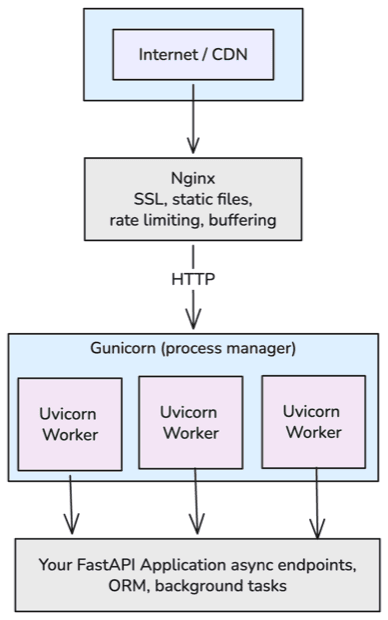
Internet -> Nginx (port 80/443) -> Gunicorn (port 8000) -> Your FastAPI App
Why Nginx?
- SSL/TLS termination - Handle HTTPS at Nginx, pass plain HTTP to Gunicorn
- Static file serving - Nginx serves static files orders of magnitude faster than Python
- Request buffering - Nginx absorbs slow client connections so Gunicorn workers aren't tied up waiting for clients to send data
- Rate limiting and security - Block malicious traffic before it reaches your app
- Load balancing - Distribute traffic across multiple Gunicorn instances
Nginx Configuration
upstream fastapi_app {
    server 127.0.0.1:8000;
}

server {
    listen 80;
    server_name yourdomain.com;

    # Redirect HTTP to HTTPS
    return 301 https://$host$request_uri;
}

server {
    listen 443 ssl;
    server_name yourdomain.com;

    ssl_certificate /etc/letsencrypt/live/yourdomain.com/fullchain.pem;
    ssl_certificate_key /etc/letsencrypt/live/yourdomain.com/privkey.pem;

    location / {
        proxy_pass http://fastapi_app;
        proxy_set_header Host $host;
        proxy_set_header X-Real-IP $remote_addr;
        proxy_set_header X-Forwarded-For $proxy_add_x_forwarded_for;
        proxy_set_header X-Forwarded-Proto $scheme;

        # WebSocket support (if needed)
        proxy_http_version 1.1;
        proxy_set_header Upgrade $http_upgrade;
        proxy_set_header Connection "upgrade";
    }
}
Step 4: Systemd Service (VM Deployments)
On a VM, use systemd to manage Gunicorn:
# /etc/systemd/system/fastapi-app.service
[Unit]
Description=FastAPI Application
After=network.target

[Service]
User=app
Group=app
WorkingDirectory=/opt/myapp
Environment="PATH=/opt/myapp/venv/bin"
ExecStart=/opt/myapp/venv/bin/gunicorn main:app -c gunicorn_config.py
ExecReload=/bin/kill -HUP $MAINPID
Restart=always
RestartSec=3

[Install]
WantedBy=multi-user.target
Enable and start:
sudo systemctl daemon-reload
sudo systemctl enable fastapi-app
sudo systemctl start fastapi-app
Zero-downtime deployment: Push new code, then sudo systemctl reload fastapi-app. This sends SIGHUP to Gunicorn, which gracefully replaces workers without dropping connections.
Step 5: Docker Deployment
For containerized deployments, the approach changes. In Docker/Kubernetes, you typically run one Uvicorn process per container and let the orchestrator handle scaling and restarts.
Production Dockerfile
FROM python:3.12-slim

WORKDIR /app

# Install dependencies first (layer caching)
COPY requirements.txt .
RUN pip install --no-cache-dir -r requirements.txt

# Copy application code
COPY . .

# Run with Gunicorn + Uvicorn workers
CMD ["gunicorn", "main:app", \
     "-k", "uvicorn.workers.UvicornWorker", \
     "-w", "4", \
     "-b", "0.0.0.0:8000", \
     "--access-logfile", "-", \
     "--error-logfile", "-"]
Single-Process Container (Kubernetes Pattern)
If Kubernetes handles scaling, use a single Uvicorn process:
CMD ["uvicorn", "main:app", "--host", "0.0.0.0", "--port", "8000"]
Kubernetes provides crash recovery (pod restart), scaling (HPA), health checks (liveness/readiness probes), and rolling deploys - so you don't need Gunicorn's process management.
Docker Compose Example
For simpler deployments:
# docker-compose.yml
version: "3.8"

services:
  api:
    build: .
    ports:
      - "8000:8000"
    environment:
      - DATABASE_URL=postgresql+asyncpg://user:pass@db:5432/mydb
    depends_on:
      - db
    restart: always
    healthcheck:
      test: ["CMD", "curl", "-f", "http://localhost:8000/health"]
      interval: 30s
      timeout: 10s
      retries: 3

  db:
    image: postgres:16
    volumes:
      - postgres_data:/var/lib/postgresql/data
    environment:
      - POSTGRES_USER=user
      - POSTGRES_PASSWORD=pass
      - POSTGRES_DB=mydb

  nginx:
    image: nginx:alpine
    ports:
      - "80:80"
      - "443:443"
    volumes:
      - ./nginx.conf:/etc/nginx/conf.d/default.conf
    depends_on:
      - api

volumes:
  postgres_data:
Health Check Endpoint
Always include a health check endpoint in your FastAPI app:
from fastapi import FastAPI

app = FastAPI()

@app.get("/health")
async def health_check():
    return {"status": "healthy"}
Common Production Mistakes
1. Using --reload in Production
# NEVER do this in production
uvicorn main:app --reload
The --reload flag watches the filesystem for changes and restarts the server. In production, this adds unnecessary overhead and can cause unexpected restarts if log files or temp files are written to the watched directory.
2. Not Setting Timeouts
Without a timeout, a worker that hangs on a slow database query or external API call stays hung forever, consuming resources:
# gunicorn_config.py
timeout = 120  # Kill unresponsive workers after 120 seconds
3. Running as Root
Never run your application as root. Create a dedicated user:
sudo useradd -r -s /bin/false app
sudo chown -R app:app /opt/myapp
4. Ignoring Async Compatibility
Using synchronous libraries in async endpoints blocks the event loop. This is the single biggest performance killer in FastAPI production deployments:
# BAD: blocks the event loop
@app.get("/users")
async def get_users():
    users = requests.get("https://api.example.com/users")  # sync!
    return users.json()

# GOOD: use async HTTP client
import httpx

@app.get("/users")
async def get_users():
    async with httpx.AsyncClient() as client:
        response = await client.get("https://api.example.com/users")
    return response.json()
5. Not Using --max-requests
Python processes can leak memory over time. Without periodic worker recycling, your server's memory usage creeps up until the OOM killer strikes:
gunicorn main:app -k uvicorn.workers.UvicornWorker \
  --max-requests 10000 \
  --max-requests-jitter 1000
6. Exposing Gunicorn Directly to the Internet
Gunicorn is not designed to handle slow clients, SSL negotiation, or malicious traffic. Always put Nginx, Caddy, or a cloud load balancer in front.
The Complete Production Stack
Putting it all together, a production FastAPI deployment looks like:
FAQ
Should I use Gunicorn or Uvicorn alone?
For VM deployments, use Gunicorn with UvicornWorker. For Kubernetes, Uvicorn alone is fine because K8s handles process management. See our detailed comparison.
How many workers should I run?
Start with (2 × CPU_CORES) + 1 for mixed workloads. For purely I/O-bound apps, CPU_CORES + 1 is often enough. Monitor CPU and memory, then adjust.
Do I need Nginx if I'm behind a cloud load balancer (ALB, Cloud Load Balancer)?
The cloud LB handles SSL and basic load balancing. You can skip Nginx if the LB covers your needs. But Nginx still adds value for request buffering, static files, and fine-grained rate limiting.
Can I use uvicorn --workers 4 instead of Gunicorn?
Yes, it works. But Gunicorn's process management is more mature - better signal handling, max_requests with jitter, server hooks, and dynamic scaling. For production VMs, Gunicorn is the safer choice. For more details, see when to use them together.
What about Hypercorn or Daphne?
Both are ASGI servers. Hypercorn supports HTTP/2 natively. Daphne is Django Channels' default server. For FastAPI specifically, Uvicorn (with or without Gunicorn) is the most common and best-supported choice.
How do I handle database connections in production?
Use async database drivers (asyncpg for PostgreSQL, aiomysql for MySQL) with connection pooling. SQLAlchemy 2.0+ supports async natively. Never create a new database connection per request - use a connection pool.
from sqlalchemy.ext.asyncio import create_async_engine, AsyncSession

engine = create_async_engine(
    "postgresql+asyncpg://user:pass@db:5432/mydb",
    pool_size=20,
    max_overflow=10,
)
Is FastAPI production ready?
Yes. FastAPI is used in production at Microsoft, Netflix, Uber, and many other companies. The framework itself is solid. Production readiness depends on how you deploy it - which is exactly what this guide covers.